Tag: AMS data management

  • Email Chaos? Construction VAs Can Clean It Up: The Ultimate Guide for Contractors

    Email Chaos? Construction VAs Can Clean It Up: The Ultimate Guide for Contractors

    How Specialized Virtual Assistants Are Transforming Email Management for Construction Companies

    Is your inbox overflowing with project inquiries, vendor communications, and client questions? You’re not alone. According to a recent industry survey, construction professionals spend an average of 2.5 hours daily managing emails—time that could be better spent on job sites or developing business. The solution may be simpler than you think: construction-specialized virtual assistants. This comprehensive guide reveals how Citrus Assistants’ virtual professionals are helping contractors reclaim valuable hours while ensuring no important message falls through the cracks.

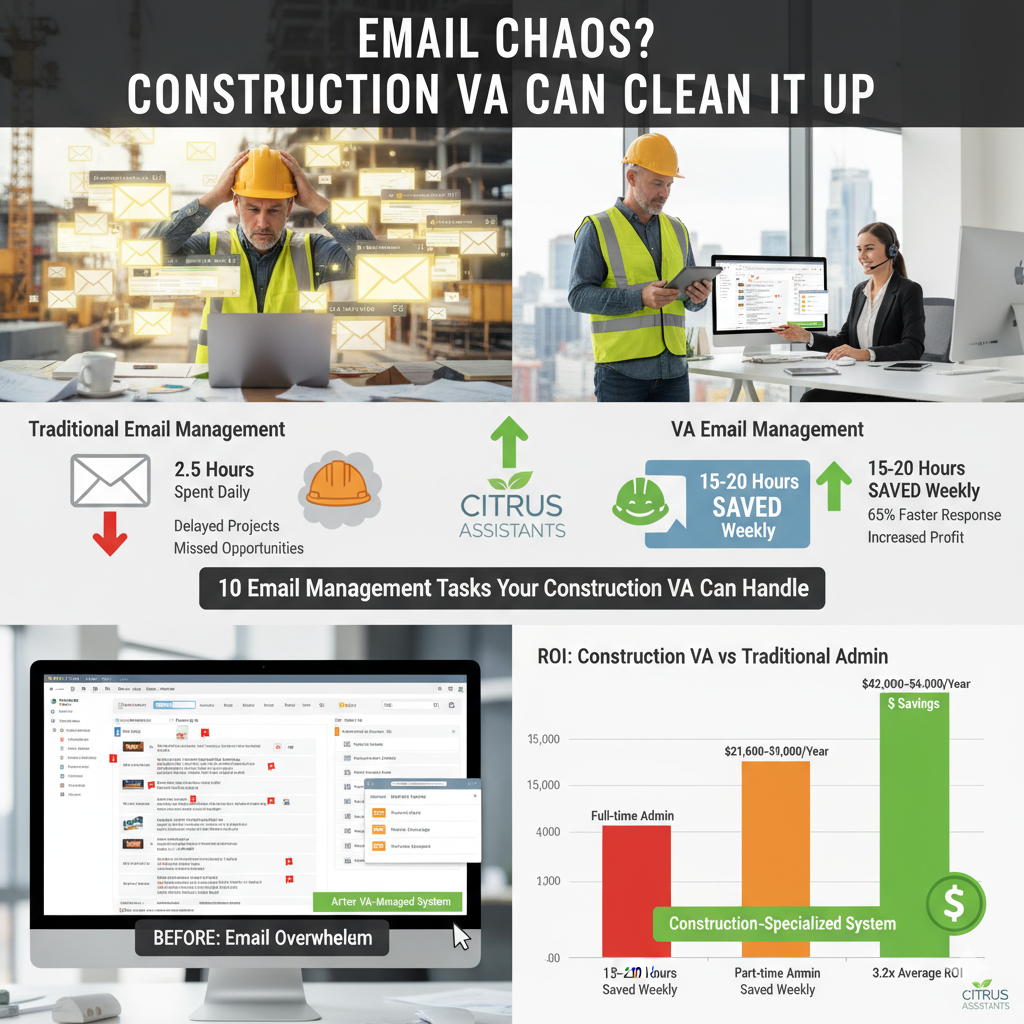
    ![Construction professional overwhelmed with emails on laptop at job site]

    Quick Takeaways:

    • Construction companies can save 15-20 hours weekly by delegating email management to specialized virtual assistants
    • VAs trained in construction terminology can categorize, prioritize and respond to 80% of routine emails without owner intervention
    • Email organization systems created by construction VAs reduce response times by up to 65%
    • Construction-specific virtual assistants understand industry documentation, terminology, and communication protocols
    • Implementing a VA email management solution costs 76% less than hiring a full-time administrative employee

    The Hidden Cost of Email Chaos in Construction Businesses

    For construction business owners and project managers, email overload represents more than just a daily annoyance—it’s a significant drain on productivity and profitability. When critical communications about bids, material deliveries, schedule changes, or compliance issues get buried in a disorganized inbox, the consequences can be severe.

    (Illustrates the negative impact of disorganized email in construction.)

    The Real Impact of Poor Email Management

    Construction companies facing email management challenges frequently experience:

    • Delayed project timelines: Missing time-sensitive communications from suppliers or subcontractors can push projects behind schedule
    • Lost business opportunities: Slow responses to bid requests or client inquiries often result in missed contracts
    • Compliance risks: Overlooked notifications about permits, inspections, or regulatory requirements can lead to costly penalties
    • Client dissatisfaction: When client questions sit unanswered for days, satisfaction and referral rates plummet
    • Team confusion: Important internal communications lost in email chaos create misunderstandings and duplicated efforts

    According to construction efficiency research, professionals who implement effective email management systems save an average of 7.3 hours weekly and reduce project delays by 23%. Yet many small and mid-sized construction companies lack the systems and personnel to manage communications effectively.

    How Construction-Specialized Virtual Assistants Transform Email Management

    Virtual assistants with specialized construction industry training provide a powerful solution to email overwhelm. Unlike general VAs or standard filters, construction-focused assistants from Citrus understand industry terminology, priorities, and workflows.

    The Construction VA Difference

    What makes Citrus Assistants’ construction virtual assistants particularly effective for email management:

    1. Industry-Specific Knowledge

    Construction VAs understand:

    • Project lifecycle terminology
    • The difference between RFIs, submittals, and change orders
    • Which communications require immediate attention versus which can wait
    • How to recognize urgent safety or compliance issues that need escalation

    2. Sophisticated Email Organization Systems

    Experienced construction VAs implement customized systems including:

    • Project-specific folder structures that align with your active jobsites
    • Priority flagging protocols based on sender, subject matter, and timing
    • Document tracking for permits, certificates of insurance, and compliance materials
    • Integration with project management platforms like Procore, BuilderTrend, or CoConstruct

    3. First-Response Capability

    Well-trained construction VAs can immediately:

    • Acknowledge receipt of important communications
    • Answer routine questions using approved templates
    • Direct urgent matters to the appropriate team member
    • Schedule follow-up actions for more complex inquiries

    4. Documentation and Follow-Through

    Construction email management isn’t just about reading messages—it’s about ensuring nothing falls through the cracks:

    • Creating action items from email requests
    • Following up on outstanding communications
    • Documenting all client and vendor interactions
    • Ensuring compliance materials are properly filed and accessible

    10 Email Management Tasks Your Construction VA Can Handle

    Wondering exactly how a construction-specialized virtual assistant can transform your email workflow? Here are the specific tasks Citrus Assistants can take off your plate:
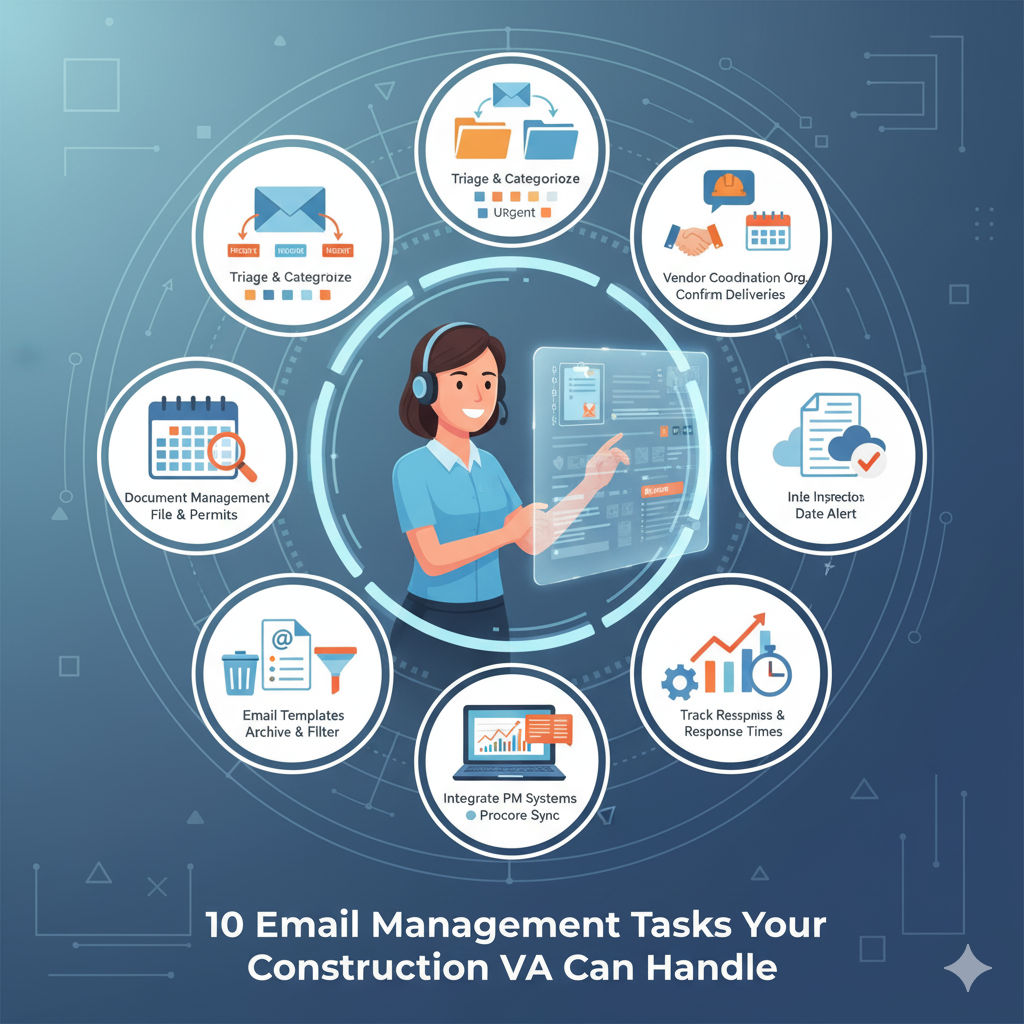
     (Visual representation of a virtual assistant efficiently managing various email tasks for a construction company.)

    1. Initial Email Triage and Categorization

    Your VA will review incoming messages, categorizing them by:

    • Project name/number
    • Communication type (bid request, vendor communication, client inquiry)
    • Urgency level (immediate attention, same-day, or routine)
    • Required action (needs response, for information only, requires escalation)

    This initial sorting alone saves contractors an average of 45 minutes daily.

    2. Client Communication Management

    Construction virtual assistants excel at maintaining client relationships through email by:

    • Responding to routine client questions using approved language
    • Scheduling site visits or client meetings
    • Sending project updates and progress reports
    • Managing expectations about timelines and next steps

    3. Vendor and Subcontractor Coordination

    A construction VA will:

    • Acknowledge receipt of subcontractor availability updates
    • Confirm delivery schedules and material arrivals
    • Follow up on outstanding quotes or proposals
    • Maintain records of all vendor communications for reference

    4. Bid and Proposal Organization

    When new opportunities arrive via email, your VA can:

    • Extract key information from RFPs and bid requests
    • Create calendared reminders for submission deadlines
    • Organize supporting documents needed for proposals
    • Distribute bid information to estimating teams

    5. Document and Attachment Management

    Construction emails often contain critical attachments. Your VA will:

    • Extract and properly file plans, drawings, and specifications
    • Track insurance certificates and compliance documents
    • Ensure permits and inspection reports are properly stored
    • Create accessible links to large files for team access

    6. Schedule and Timeline Communications

    Your construction VA will manage schedule-related emails by:

    • Updating digital calendars with inspection dates
    • Coordinating site access schedules
    • Sending reminders about upcoming deadlines or milestones
    • Notifying affected parties about schedule changes

    7. Email Template Creation and Management

    To ensure consistency, your VA can:

    • Develop standardized responses for common inquiries
    • Create project update templates
    • Design professional email signatures with proper disclaimers
    • Maintain a library of approved language for various situations

    8. Inbox Cleanup and Maintenance

    Beyond daily management, construction VAs perform regular:

    • Archiving of completed project communications
    • Organization of reference materials
    • Deletion of unnecessary messages
    • Implementation of improved filtering systems

    9. Integration with Project Management Systems

    A skilled construction VA will:

    • Forward relevant emails to project management platforms
    • Update task statuses based on email communications
    • Ensure email discussions are documented in project records
    • Maintain consistency between email communications and PM software

    10. Email Analytics and Improvement

    Your construction VA can provide valuable insights by:

    • Tracking response times to different communication types
    • Identifying communication bottlenecks
    • Reporting on common client questions or concerns
    • Suggesting process improvements for clearer communication

    Real Results: Case Studies in Construction Email Management

    Case Study 1: Mid-Size Residential Builder

    Challenge: A residential construction company with 12 active projects was losing track of important subcontractor availability updates, resulting in scheduling conflicts and project delays.

    Solution: Citrus Assistants implemented a construction-specific email management system with:

    • Project-specific folders with sub-categories for trades
    • Color-coded flagging system for schedule impact communications
    • Daily priority summaries for the construction manager
    • Automated subcontractor availability tracking

    Results:

    • 78% reduction in scheduling conflicts
    • 3.5 hours daily saved for the construction manager
    • 42% faster response time to subcontractors
    • Improved subcontractor retention due to better communication

    Case Study 2: Commercial Contractor

    Challenge: A growing commercial contractor was missing bid opportunities because RFPs were getting buried in busy inboxes, with an estimated $350,000 in lost potential revenue in a single quarter.

    Solution: A Citrus construction VA implemented:

    • Immediate acknowledgment protocol for all bid requests
    • Dedicated RFP tracking system with deadline alerts
    • Daily bid opportunity summaries
    • Standardized process for distributing bid documents to estimating team

    Results:

    • 100% response rate to new bid opportunities
    • 23% increase in successful bid submissions
    • $127,000 in newly secured contracts in the first month
    • Reduced stress and improved focus for the estimating team

    Case Study 3: Specialty Subcontractor

    Challenge: A specialty subcontractor was experiencing project delays due to slow communication about material specifications and approval requests.

    Solution: Citrus Assistants provided a virtual assistant who:

    • Created a submittal tracking system
    • Implemented 24-hour response protocols for all architect communications
    • Developed a flagging system for approval-dependent tasks
    • Established regular status update emails to all project stakeholders

    Results:

    • 65% faster turnaround on submittal approvals
    • Elimination of “lost” specification emails
    • Improved relationships with general contractors
    • Reduction in expedited shipping costs for last-minute materials

    Implementation: Getting Started with a Construction VA for Email Management

    Transitioning to a virtual assistant for email management doesn’t have to be complicated. Citrus Assistants’ specialized construction VAs can be fully operational within days, not weeks. Here’s how the process works:

    Step 1: Email Workflow Assessment

    Your dedicated construction VA will:

    • Review your current email volume and patterns
    • Identify your most pressing communication challenges
    • Document your preferences for response handling
    • Map existing project structures and priorities

    Step 2: System Creation and Implementation

    Based on the assessment, your VA will:

    • Create customized folder structures and filtering rules
    • Develop standardized templates for common responses
    • Establish escalation protocols for urgent matters
    • Set up reporting mechanisms to track progress

    Step 3: Gradual Transition

    To ensure a smooth transition:

    • Your VA will begin with monitoring and organizing
    • Progress to drafting responses for your review
    • Gradually take on direct response capabilities for routine matters
    • Continuously refine the system based on feedback

    Step 4: Ongoing Optimization

    The email management system will evolve with your business:

    • Regular reviews of communication efficiency
    • Adjustments to accommodate new projects or team members
    • Implementation of new tools or integrations as needed
    • Expanded capabilities as trust and familiarity grow

    Overcoming Common Concerns About Email Delegation

    Many construction professionals hesitate to delegate email management due to understandable concerns. Let’s address the most common:

    Concern: “No one else understands our projects well enough”

    Reality: Citrus Assistants’ construction VAs undergo specialized training in construction terminology, processes, and priorities. They quickly learn your specific projects and can identify truly urgent matters that require your attention.

    Concern: “I need to maintain personal relationships with clients”

    Reality: A good email management system enhances relationships by ensuring faster responses while routing relationship-critical communications to you. Your VA can handle routine updates while you focus on meaningful client interactions.

    Concern: “Email contains sensitive information”

    Reality: Citrus Assistants implements strict confidentiality agreements and security protocols. Additionally, you maintain control over which email types your VA handles and which require your personal attention.

    Concern: “It will take too long to train someone”

    Reality: Because our virtual assistants already specialize in construction, the onboarding process is remarkably efficient. Most clients see positive results within the first week of implementation.

    Cost-Benefit Analysis: The ROI of Construction VA Email Management

    When considering a construction-specialized virtual assistant for email management, the return on investment becomes clear:
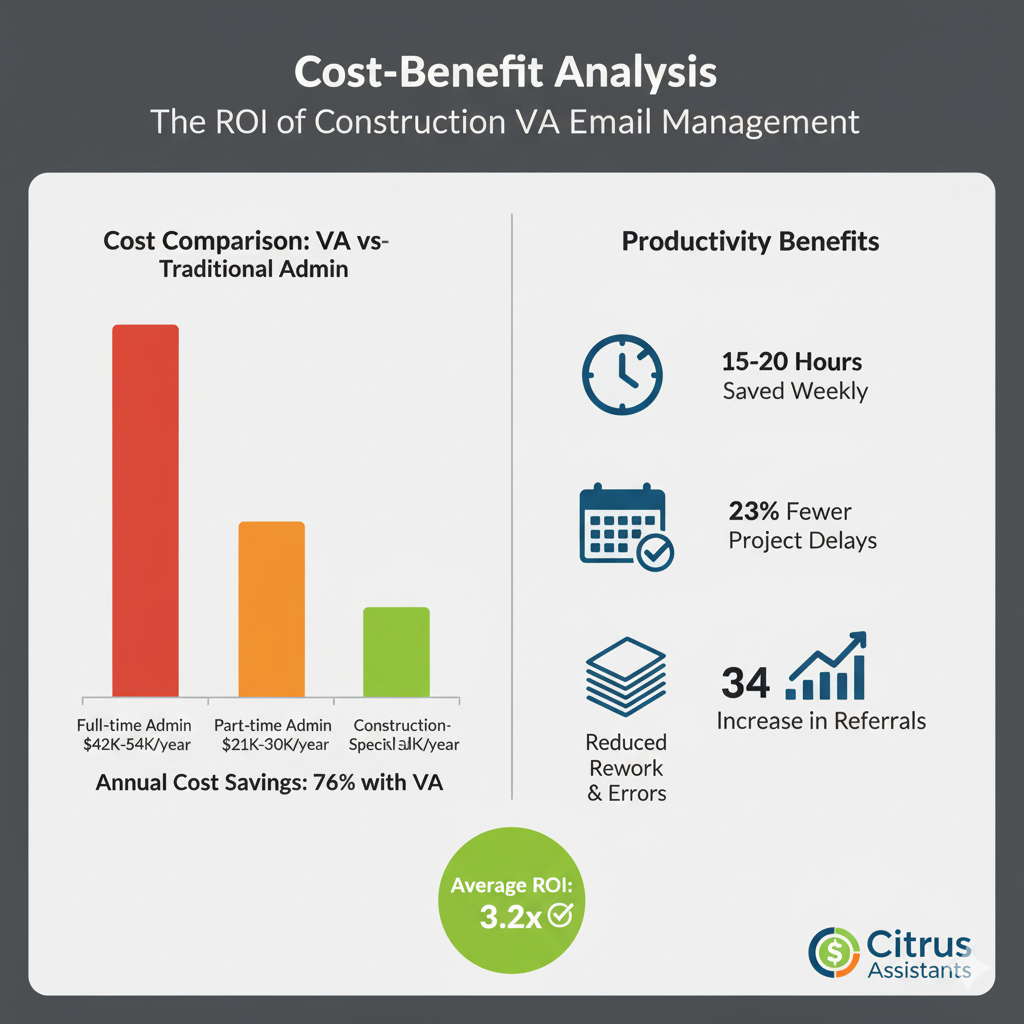
    (Compares the cost-effectiveness and productivity benefits of a Construction VA versus traditional administrative roles.)

    Cost Comparison

    SolutionMonthly CostAnnual Cost
    Full-time administrative assistant$3,500-$4,500$42,000-$54,000
    Part-time administrative help$1,800-$2,500$21,600-$30,000
    Construction-specialized VA$1,000-$1,500$12,000-$18,000

    Productivity Benefits

    Beyond direct cost savings, consider the productivity gains:

    • Average contractor saves 15-20 hours monthly on email management
    • Faster response times lead to 23% fewer project delays
    • Improved document organization reduces rework and errors
    • Better client communication increases referral rates by up to 34%

    The combination of cost savings and productivity improvements creates an average ROI of 3.2x for construction companies implementing specialized VA email management.

    Ready to Tame Your Construction Email Chaos?

    Email overload shouldn’t be the price you pay for running a successful construction business. With a construction-specialized virtual assistant from Citrus Assistants, you can transform your communication systems from a source of stress to a competitive advantage.

    The most successful contractors recognize that their time is best spent on job sites, with clients, and developing their businesses—not sorting through hundreds of emails. By implementing a strategic email management solution with a construction-specialized VA, you can:

    • Reclaim 10+ hours weekly for high-value work
    • Ensure no important communication is missed
    • Improve client and vendor relationships through prompt responses
    • Reduce the stress of information overload
    • Create systematic documentation of all project communications

    Take the first step toward email sanity. Contact Citrus Assistants today for a free consultation on how our construction-specialized virtual assistants can transform your email management and help your business operate with greater efficiency and less stress.

    FAQ About Construction VA Email Management

    How quickly can a construction VA start managing my emails?

    Most Citrus Assistants construction VAs can begin basic email organization within 24-48 hours of onboarding. Full response capabilities typically develop within 1-2 weeks as they become familiar with your specific projects and preferences.

    What if there are emails only I should see or respond to?

    Your email management system will be customized to your preferences. Many contractors establish clear guidelines about which communications require their personal attention, and which can be handled by their VA. These parameters can be adjusted at any time.

    How does my VA access my email without compromising security?

    Citrus Assistants offers several secure options, including dedicated user accounts with appropriate permissions, secure email management platforms, or monitored access solutions. All VAs sign comprehensive confidentiality agreements and follow strict security protocols.

    Can a construction VA handle project-specific email communications if they don’t know the details of my projects?

    Yes! Your VA will be briefed on active projects and will develop a system for categorizing and prioritizing project communications. For technical questions beyond their knowledge base, they’ll escalate appropriately while still ensuring nothing gets lost.

    What’s the difference between a construction-specialized VA and a general virtual assistant for email management?

    Construction-specialized VAs understand industry terminology, recognize the urgency of different types of communications (e.g., stop work orders vs. general inquiries), and are familiar with construction documentation and compliance requirements. This specialized knowledge allows them to categorize, prioritize, and respond to construction emails much more effectively than general administrative assistants.

    References and Resources

    1. Construction Management Association of America (CMAA). (2023). “Communication Efficiency in Construction Project Management.”
    2. Smith, J. & Wilson, T. (2022). “Administrative Productivity in Small Construction Firms.” Journal of Construction Engineering and Management, 45(3), 112-128.
    3. Construction Industry Institute. (2023). “Best Practices for Communication Management in Construction Projects.”
    4. National Association of Home Builders. (2022). “Administrative Costs in Residential Construction: Finding Efficiencies.”
    5. Johnson, R. (2023). “Virtual Assistance in Specialty Trades: Case Studies in Productivity Improvement.” Construction Business Management Journal, 18(2), 76-89.

    How is your construction company handling email overload? Share your challenges and solutions in the comments below, or contact us to discuss how a construction-specialized virtual assistant might transform your communication systems.


  • How to Get Job Site Updates Faster with a Remote Assistant: Streamlining Construction Communication

    How to Get Job Site Updates Faster with a Remote Assistant: Streamlining Construction Communication

    Quick Summary

    Time-saving solution: Remote assistants can collect, organize, and distribute job site updates, saving contractors 5-7 hours weekly while ensuring all stakeholders stay informed. Real-time communication: Virtual assistants bridge the gap between field teams and office management by centralizing updates from multiple projects. Cost-effective alternative: At just 25% the cost of a full-time site coordinator, remote assistants provide affordable communication management for construction businesses of all sizes.


    Introduction: The Communication Challenge on Construction Sites

    Are you constantly chasing foremen and subcontractors for updates? Do you find yourself spending hours each week coordinating information between the job site and the office? According to the Construction Management Association of America, poor communication is responsible for 48% of all rework on construction projects, costing the industry billions annually.

    For contractors and construction business owners, keeping track of daily progress, challenges, and changes across multiple job sites can feel like a full-time job itself—one that takes away from more valuable tasks like client meetings, bidding new projects, or actually managing the work. This is where a specialized remote assistant can transform your operations.

    In this comprehensive guide, we’ll explore how contractors can leverage virtual assistants to get faster, more accurate job site updates while reducing administrative burden and improving project timelines. Whether you’re managing a single residential build or overseeing multiple commercial projects, the strategies outlined here will help you establish a communication system that keeps everyone informed without consuming your valuable time.

    Why Job Site Updates Are Critical to Project Success

    Before diving into solutions, let’s understand why timely job site updates are so crucial:

    Preventing Costly Delays

    When information doesn’t flow efficiently between the field and office, decisions get delayed, materials arrive late, and scheduling conflicts emerge. The Lean Construction Institute reports that construction projects typically operate at only 60% efficiency, with communication gaps being a primary culprit.

    Maintaining Client Confidence

    Regular, professional updates keep clients informed and confident in your management. In fact, client satisfaction scores are 72% higher for contractors who provide consistent communication throughout projects.

    Documenting Progress for Compliance and Billing

    Accurate documentation of daily activities isn’t just good practice—it’s essential for regulatory compliance, progress billing, and protecting yourself in case of disputes. Yet, many contractors struggle to maintain comprehensive records while juggling other responsibilities.

    Team Coordination and Accountability

    When multiple subcontractors and team members are involved, clear communication ensures everyone knows their responsibilities and timelines. Without it, accountability suffers and finger-pointing begins when issues arise.

    Common Communication Challenges for Contractors

    Most contractors face these recurring communication hurdles:

    • Information Bottlenecks: Field supervisors are too busy managing work to document and report consistently
    • Scattered Communication Channels: Updates coming through texts, calls, emails, and apps create a fragmented information ecosystem
    • Administrative Overload: Processing and distributing updates takes time away from core business activities
    • Technology Adoption Barriers: Not everyone on the team may be comfortable with digital communication tools
    • After-Hours Updates: Important information often comes in after business hours when office staff is unavailable

    These challenges create a perfect storm where critical information gets delayed, lost, or miscommunicated, ultimately affecting project timelines and profitability.

    Visualizing fragmented communication versus a centralized solution.

    How Remote Assistants Transform Job Site Communication

    A specialized remote assistant from Citrus Assistants can serve as your central communication hub, collecting information from multiple sources and ensuring it reaches the right people at the right time. Here’s how they make a difference:

    1. Centralizing Communication Channels

    Your remote assistant becomes the single point of contact for all job site updates, consolidating information from:

    • Text messages and WhatsApp groups
    • Phone calls from foremen and subcontractors
    • Email updates and photos
    • Project management software entries
    • Weather alerts and logistics updates

    By channeling all communications through one dedicated professional, you eliminate the scattered approach that leads to missed information.

    2. Creating Standardized Update Protocols

    Remote assistants can implement and manage standardized reporting systems:

    • Creating simple daily report templates that foremen can quickly complete
    • Setting up automated reminders for site supervisors to submit updates
    • Establishing clear communication schedules that everyone follows
    • Processing incoming information into standardized formats for easy review

    These protocols ensure consistency in reporting, making information more useful and accessible.

    3. Real-Time Processing of Updates

    Unlike in-house staff who may be unavailable after hours, remote assistants can offer extended coverage:

    • Processing updates as they arrive, even outside traditional business hours
    • Flagging critical issues that require immediate attention
    • Maintaining an up-to-date project status dashboard
    • Sorting updates by priority and relevance

    This real-time approach means you start each day fully informed about what happened on your job sites the previous day.

    4. Distributing Information to Stakeholders

    Remote assistants ensure everyone who needs information receives it appropriately:

    • Preparing daily summary reports for management
    • Creating client-friendly progress updates with photos
    • Notifying procurement about materials needs or issues
    • Alerting scheduling about potential conflicts or delays
    • Documenting issues for quality control and compliance teams

    This targeted distribution ensures that everyone has the information they need without overwhelming them with irrelevant details.

    10 Specific Ways Remote Assistants Handle Job Site Updates

    Here’s how your Citrus Assistant can specifically improve job site communication:

    1. Daily Update Collection and Compilation

    Your assistant contacts each job site supervisor at a designated time to collect updates on progress, challenges, and needs. They compile this information into a standardized format that highlights key points requiring attention.

    2. Photo and Video Documentation Management

    Field teams can send photos and videos to your assistant, who organizes them by project, area, and date, creating a visual record of progress that’s invaluable for both documentation and client updates.

    3. Weather Impact Monitoring

    Your assistant tracks weather forecasts for all job site locations and proactively alerts teams about conditions that might affect work schedules, allowing for better planning and resource allocation.

    4. Subcontractor Coordination

    When multiple subcontractors are involved, your remote assistant can coordinate schedules, confirm arrivals, and ensure each team has what they need to proceed efficiently.

    5. Materials and Equipment Tracking

    As updates come in about materials usage or equipment needs, your assistant can maintain inventory tracking and coordinate with suppliers to ensure timely deliveries.

    6. Client Communication Management

    Your remote assistant can craft professional daily or weekly updates for clients, incorporating photos and highlighting progress while managing expectations about timelines.

    7. Regulatory Documentation Preparation

    Using information from site updates, assistants can help prepare documentation required for inspections, compliance reporting, and permit requirements.

    8. Issue and Resolution Tracking

    When problems arise, your assistant documents them and tracks the resolution process, creating accountability and ensuring nothing falls through the cracks.

    9. After-Hours Emergency Coordination

    For urgent situations that occur outside business hours, your remote assistant can follow established protocols to notify the appropriate team members and coordinate responses.

    10. Progress Reporting and Analytics

    Over time, your assistant can compile data from daily updates to identify patterns, bottlenecks, and efficiency opportunities across multiple projects.

    Case Studies: Real Results from Contractors Using Remote Assistants

    Case Study 1: Residential Builder Saves 15 Hours Weekly

    Tom operates a residential construction company with 3-5 active projects. Before partnering with Citrus Assistants, he spent 2-3 hours daily calling foremen, answering subcontractor questions, and updating clients.

    After implementing a remote assistant solution:

    • His assistant collects updates from all sites by 4:00 PM daily
    • Compiles a management summary ready for Tom’s review by 5:30 PM
    • Prepares client-friendly weekly updates with photos
    • Coordinates with subcontractors about schedule changes

    Result: Tom saved 15 hours weekly and reduced schedule delays by 23%, allowing him to take on an additional project without hiring more supervisory staff.

     Infographic showing the positive ROI of a remote assistant in construction.

    Case Study 2: Commercial Contractor Improves Client Satisfaction

    Garcia Construction specializes in commercial renovations with 7-10 concurrent projects. They struggled with consistent client communication and often faced questions about project status.

    After bringing on a Citrus Assistant:

    • Created a standardized daily reporting system across all projects
    • Implemented twice-weekly client updates with progress photos
    • Set up a digital dashboard showing real-time project status
    • Established protocols for communicating and documenting change orders

    Result: Client satisfaction scores improved by 47%, and the company reduced time spent on client calls by 62%, allowing project managers to focus on quality and execution.

    Case Study 3: Specialty Contractor Reduces Documentation Backlog

    Lightning Electric was constantly behind on documentation, creating challenges with billing and compliance. Their field team was excellent technically but struggled with timely reporting.

    Their Citrus Assistant solution:

    • Calls each crew leader daily for a 5-minute update
    • Processes photos sent via text into organized project folders
    • Completes required documentation based on verbal updates
    • Manages material ordering and delivery scheduling

    Result: Documentation backlog was eliminated within two weeks, billing cycles shortened by 40%, and the company passed their compliance audit with zero deficiencies for the first time in five years.

    How to Implement a Remote Assistant for Your Job Site Updates

    Ready to transform your job site communication? Follow these steps to implement an effective remote assistant solution:

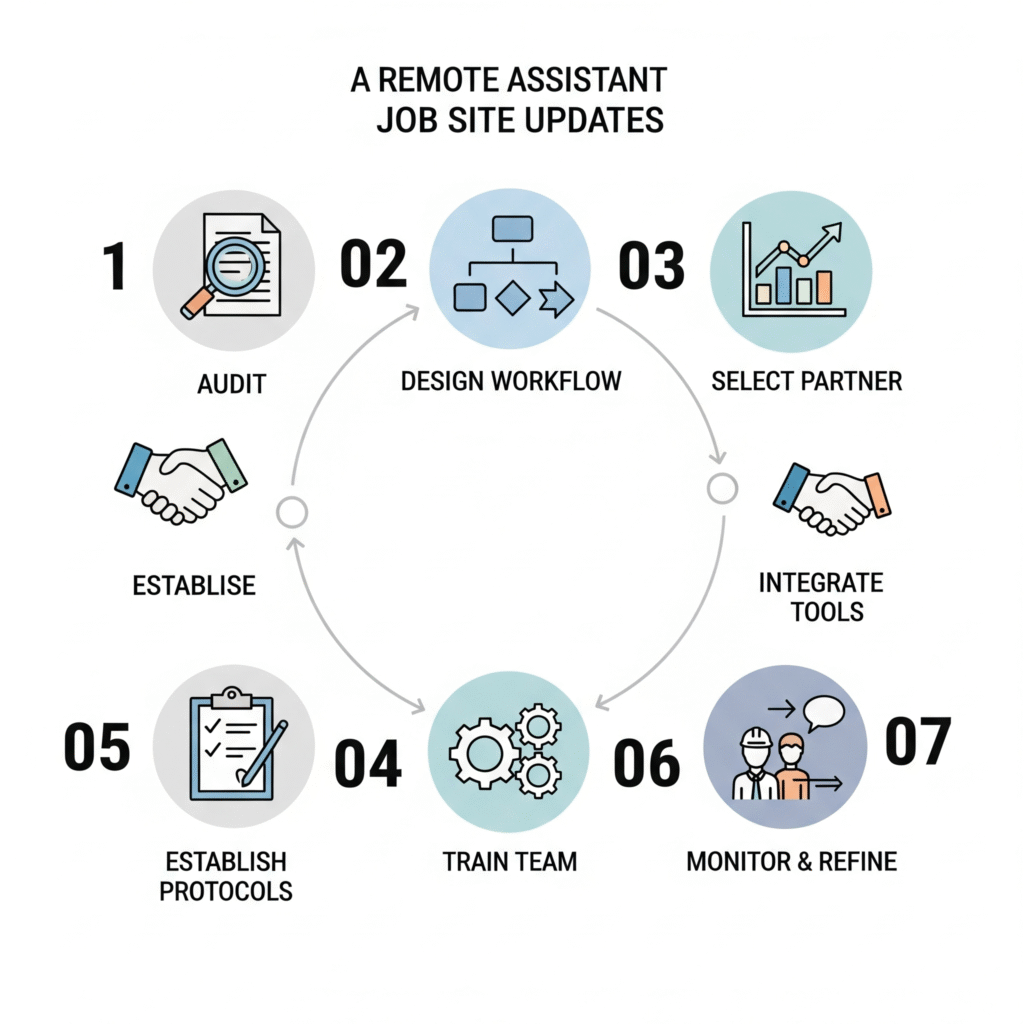
    1. Audit Your Current Communication Process

    Before making changes, document how updates currently flow through your organization. Identify:

    • Where bottlenecks occur
    • Which information consistently gets missed
    • How much time team members spend on reporting and coordination
    • The costs associated with communication breakdowns

    2. Design Your Ideal Communication Workflow

    Create a clear vision for how you want information to flow:

    • Who should provide updates and how often
    • What format works best for different types of information
    • Who needs to receive which updates
    • How urgent issues should be handled differently from routine updates

    3. Select the Right Remote Assistant Partner

    Not all virtual assistant services understand construction. Look for:

    • Experience with construction industry workflows
    • Familiarity with common project management tools
    • Ability to provide coverage during your operating hours
    • Capacity to learn your specific processes quickly

    Citrus Assistants specializes in supporting contractors with assistants who understand construction terminology, workflows, and priorities.

    4. Establish Clear Protocols and Templates

    Work with your assistant to create:

    • Standardized daily report templates
    • Clear guidelines for photo documentation
    • Escalation procedures for urgent issues
    • Regular communication schedules that work for your team

    5. Integrate with Existing Tools and Systems

    Your remote assistant should integrate with your existing:

    • Project management software
    • Communication tools and apps
    • Document storage systems
    • Client reporting processes

    6. Train Your Team and Set Expectations

    For successful implementation:

    • Introduce the assistant to all team members
    • Explain how and when to communicate with the assistant
    • Set clear expectations about response times and responsibilities
    • Emphasize the benefits for everyone involved

    7. Monitor and Refine the Process

    Once implemented:

    • Collect feedback from team members regularly
    • Track improvements in communication efficiency
    • Adjust protocols based on real-world experience
    • Expand the assistant’s responsibilities as appropriate
    A step-by-step visual guide to implementing a remote assistant.

    Overcoming Common Objections to Remote Assistants

    You might have concerns about incorporating a remote assistant into your communication workflow:

    “My job sites are too complex for someone remote to understand.”

    Construction-specialized remote assistants from Citrus Assistants receive training in industry terminology and processes. They don’t need to understand every technical aspect—they excel at organizing and distributing information appropriately.

    “My team won’t want to change how they communicate.”

    When implementation is done correctly, field teams usually welcome the change—especially when they realize it reduces their reporting burden while improving coordination. The key is making the new process easier than the old one.

    “I’m concerned about confidentiality of project information.”

    Reputable services like Citrus Assistants use secure communication channels and sign confidentiality agreements. Your information remains protected while becoming more organized and useful.

    “We’ve tried project management software that was supposed to solve this.”

    Software is only as good as the processes and people using it. Remote assistants complement technology by ensuring consistent use and helping technologically-challenged team members participate fully in the communication flow.

    Cost-Benefit Analysis: The ROI of Remote Assistants for Job Site Updates

    Let’s examine the financial impact of implementing a remote assistant for job site communication:

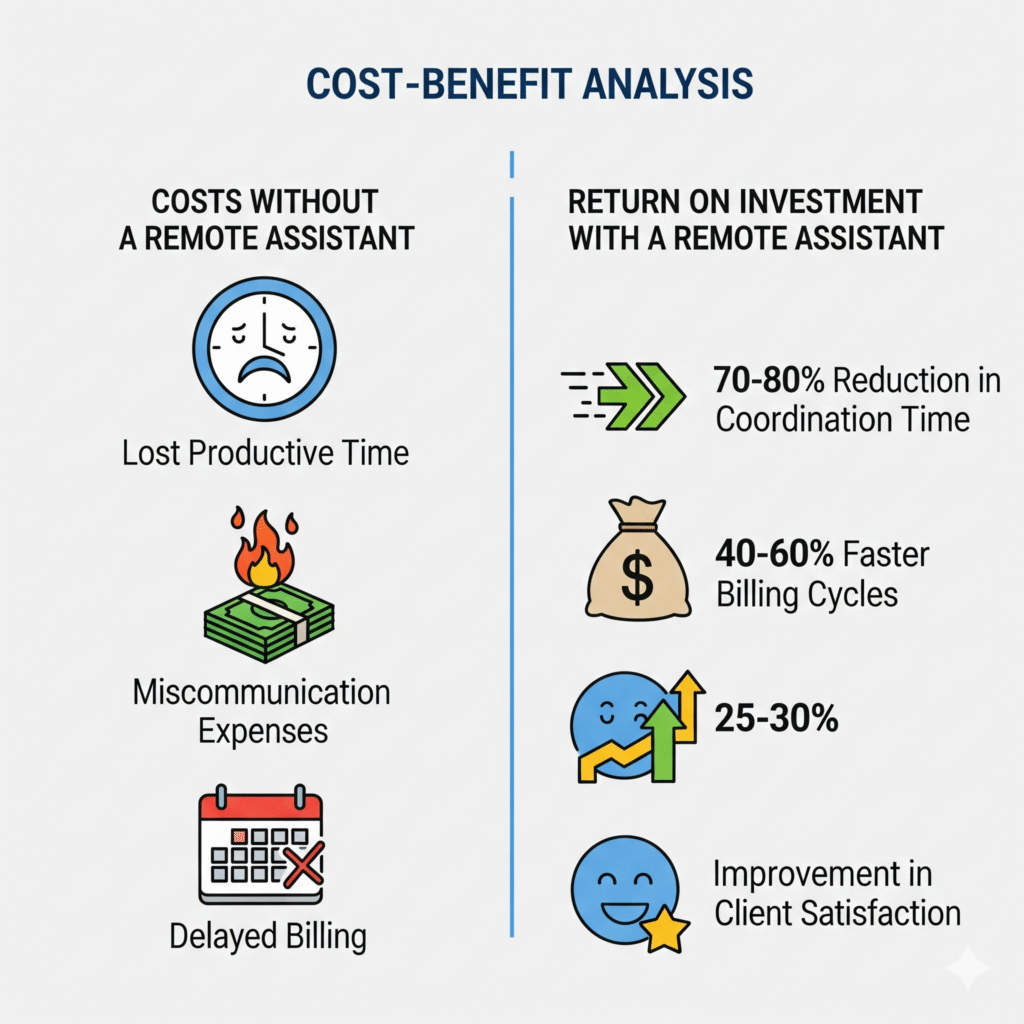
    Costs Without a Remote Assistant

    • Lost productive time: Average contractor spends 12+ hours weekly on coordination ($75/hr = $900/week)
    • Miscommunication expenses: Typical small contractor faces $3,500+ monthly in rework costs due to poor communication
    • Delayed billing cycles: Average 2-week delay in invoicing due to incomplete documentation costs $2,000+ monthly in cash flow
    • Client relationship impacts: Each dissatisfied client represents $50,000+ in lost future business

    Cost With a Remote Assistant

    • Monthly service cost: Typically $1,500-$2,500 for a part-time dedicated assistant
    • Implementation time: 5-10 hours of initial setup and training
    • Ongoing management: 1-2 hours weekly for oversight and refinement

    Return on Investment

    Most contractors see positive ROI within the first month, with typical benefits including:

    • 70-80% reduction in time spent on coordination
    • 35-50% reduction in miscommunication-related expenses
    • 40-60% faster billing cycles
    • 25-30% improvement in client satisfaction scores

    For a mid-sized contractor, this typically translates to $5,000-$10,000 monthly in direct savings and efficiency gains.

    Quick Takeaways: Getting Job Site Updates Faster

    • Centralize communication: Use a remote assistant as your single point of contact for all job site updates
    • Standardize reporting: Implement consistent formats and schedules for updates
    • Leverage technology appropriately: Combine human coordination with the right digital tools
    • Focus on essential information: Prioritize updates that impact decisions and schedules
    • Close the loop: Ensure information not only comes in but gets to everyone who needs it
    • Document consistently: Maintain comprehensive records for compliance and accountability
    • Start small: Begin with your most communication-intensive project before expanding

    Conclusion: Transform Your Job Site Communication Today

    In the fast-paced world of construction, the contractor who communicates most effectively has a significant competitive advantage. Job site updates shouldn’t be a burden that pulls you away from core business activities—they should be a streamlined process that enhances project management and client satisfaction.

    A specialized remote assistant from Citrus Assistants can transform how information flows between your job sites and office, eliminating bottlenecks, reducing administrative overhead, and ensuring everyone stays informed without consuming your valuable time.

    Ready to get faster, more reliable job site updates while reducing your administrative workload? Contact Citrus Assistants today for a consultation on how a construction-specialized remote assistant can revolutionize your project communication. Our team understands the unique challenges contractors face and can implement a customized solution that fits your specific needs and workflow.

    Don’t let another project suffer from communication gaps. Take the first step toward more efficient job site updates today.

    FAQ: Job Site Updates with Remote Assistants

    How quickly can a remote assistant implement a new communication system?

    Most contractors see their new communication system up and running within 1-2 weeks. The process involves initial consultation, workflow design, assistant training, and team onboarding. Simpler operations might implement even faster, while more complex organizations with multiple projects may require additional setup time.

    Can remote assistants handle specialized construction terminology?

    Yes! Citrus Assistants specializing in construction receive training in industry terminology, common workflows, and typical reporting needs. They quickly become familiar with your specific project types and can accurately process updates even when they contain technical jargon or specialized references.

    What if my foremen aren’t tech-savvy?

    This is actually where remote assistants shine brightest. Your assistant can collect updates through whatever method works best for each team member—phone calls, simple texts, or voice messages. They then translate these communications into standardized formats for distribution, bridging the gap between tech-savvy and traditional team members.

    How do remote assistants handle photos and visual documentation?

    Your assistant can process photos sent through text, email, or messaging apps, organizing them by project, location, and date. They can create visual progress reports, maintain digital archives, and ensure relevant stakeholders receive the visual information they need without being overwhelmed by hundreds of unsorted images.

    Will this replace our project management software?

    No—remote assistants complement your existing software by ensuring it’s consistently updated with accurate information. Many contractors find that their project management systems become significantly more valuable when a dedicated assistant ensures information is entered completely and consistently.

    References

    1. Construction Management Association of America. (2023). “Communication Challenges in Modern Construction.” CMAA Annual Report.
    2. Lean Construction Institute. (2022). “Efficiency Metrics in Commercial Construction Projects.”
    3. McGraw Hill Construction. (2024). “Client Satisfaction Factors in Residential and Commercial Construction.”
    4. Journal of Construction Engineering and Management. (2023). “Documentation Impact on Construction Dispute Resolution.”
    5. Construction Industry Institute. (2024). “Best Practices for Information Flow in Complex Projects.”

    What’s your experience with job site communication? Share in the comments below how you currently manage updates and what challenges you face. We’d love to hear your thoughts!

  • Why Construction Owners Shouldn’t Answer Calls Themselves

    Why Construction Owners Shouldn’t Answer Calls Themselves

    If you’re running a construction business, chances are your phone rings nonstop.

    Leads. Clients. Vendors. Subcontractors. Inspectors. And probably a few spam calls too.

    The instinct is to pick up every call. After all, it could be a job. But here’s the truth: every time you answer the phone, you’re stepping away from higher-value work.

    And when you’re the one doing estimates, managing crews, and juggling projects—you can’t afford that distraction.

    A stressed construction business owner on a job site answering a phone call while looking overwhelmed.

    Here’s why construction business owners shouldn’t be answering their own calls—and what to do instead.


    The Hidden Cost of Answering Calls Yourself

    On the surface, it might feel like no big deal. But those little interruptions add up fast:

    • You lose focus on jobsite tasks or project planning
    • You waste time on calls that someone else could’ve handled
    • You forget details from rushed conversations between tasks
    • You sound distracted to potential clients, which affects trust
    • You miss callbacks because you’re too busy to follow up

    Worst of all, every call you answer is time not spent growing your business.


    5 Reasons You Should Stop Taking Calls Yourself

    1. You’re Not Always Available—But Your Phone Still Rings

    Whether you’re on a ladder or in a meeting with a supplier, you can’t take every call. And when you miss them, you’re losing money.

    A virtual assistant can answer on your behalf, screen for importance, and make sure nothing gets lost.


    2. Not Every Caller Needs You

    80% of daily calls are simple:

    • “Can I get a copy of the COI?”
    • “What time are you arriving tomorrow?”
    • “Do you work in this zip code?”

    You don’t need to stop your day to answer these. A trained VA can handle them all—professionally and instantly.


    3. You’re Losing Focus on High-Priority Work

    Every call pulls your brain out of what you were doing. It takes minutes (sometimes hours) to refocus.

    By having someone else manage your calls, you can stay in deep work—whether that’s walking a job site or finalizing an estimate.


    4. You’re Not Always in “Phone Voice” Mode

    Let’s be honest—when you answer the phone mid-stress, you’re probably not giving the best first impression. Calls get rushed. Details get missed.

    A calm, professional virtual assistant gives every caller a smooth experience—every time.


    5. You’re Delaying Growth

    The time you spend on calls is time not spent:

    • Closing new contracts
    • Hiring better subs
    • Streamlining operations
    • Getting home earlier

    Delegating your call handling is a small move that unlocks huge capacity.

    A professional virtual assistant wearing a headset, smiling and confidently speaking to a caller on a video call.

    What a Call-Handling Virtual Assistant Can Do for You

    A trained VA can manage your phone line like a pro:

    • Answer business calls with your custom script
    • Route urgent issues to your mobile
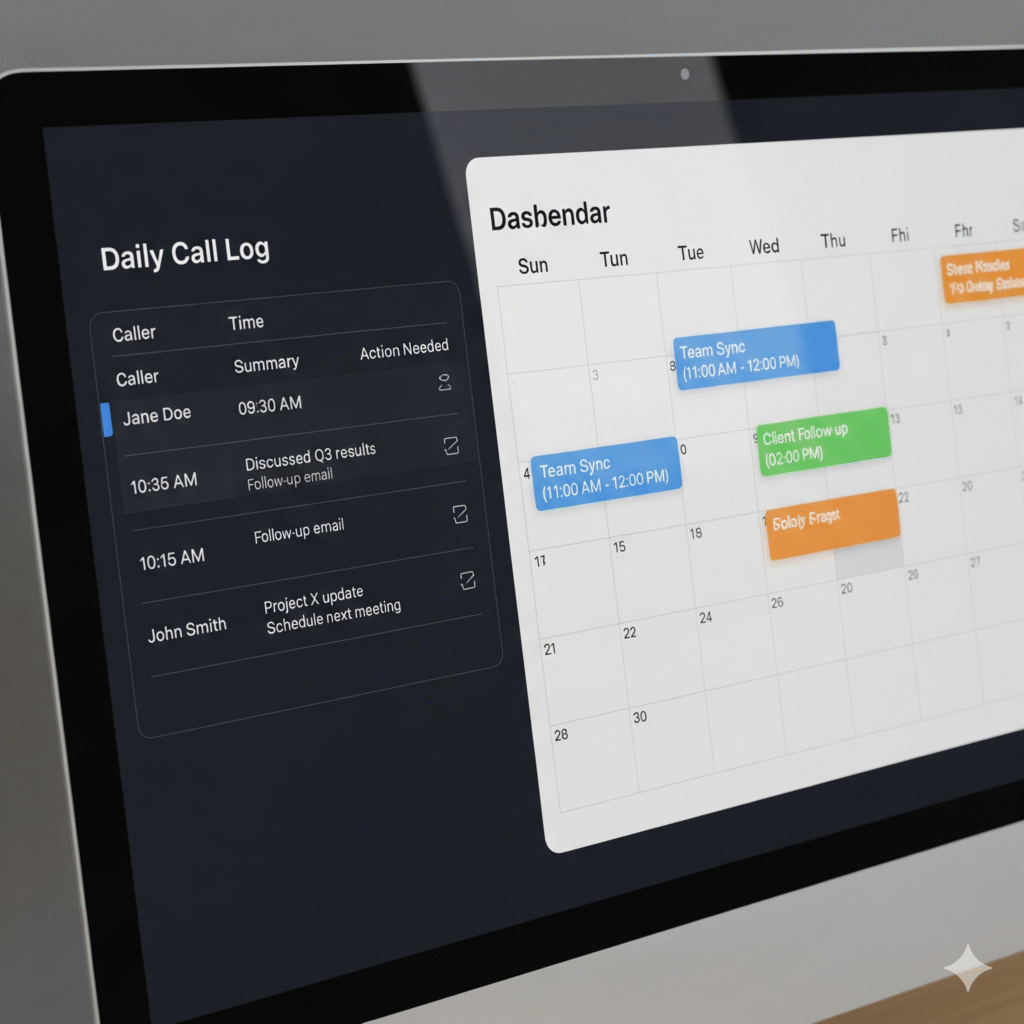
    • Send you summaries of each call
    • Return missed calls and schedule follow-ups
    • Log messages and updates in your CRM or system
    • Handle basic questions and redirect spam

    A computer screen showing a call log with details and an integrated calendar, illustrating organized communication.

    You stay informed—without being interrupted.


    How It Works: Delegating Calls in 3 Steps

    1. Set Your Preferences
      Decide what calls get forwarded to you and what your VA can handle.
    2. Use Call Forwarding or a VoIP Line
      Forward your business number to your assistant. Or use a platform like Google Voice.
    3. Review Updates on Your Time
      Instead of constant calls, get organized call summaries you can review when it’s convenient.

    That’s it. You stay in control—but free up hours every week.


    Real Results Contractors Are Seeing

    • Fewer missed leads
    • Faster response time for clients
    • Happier teams with fewer interruptions
    • More time on-site, not on the phone
    • Reduced stress and better client reviews

    You didn’t start a construction business to become your own receptionist. It’s time to hand off the phone—and focus on building.


    The Bottom Line

    Your phone shouldn’t control your day. You should.

    Every time you answer a call, you’re choosing distraction over direction. Let a trained virtual assistant take over your calls—and give you back your time, energy, and momentum.

    A calm construction owner reviewing blueprints on a peaceful job site, with their phone silently placed nearby.
  • Carrier Downloads: What VAs Can Handle for You

    Carrier Downloads: What VAs Can Handle for You

    If you run a small insurance agency, you’re no stranger to the chaos that comes with managing carrier downloads—those nonstop streams of data from carriers that land in your AMS daily.

    This image is for the introduction of your article to highlight the pain point of managing carrier downloads manually.

    Renewals, endorsements, cancellations, reinstatements—every type of policy change floods in. And someone needs to go through it all.

    The truth? These downloads don’t process themselves. And they definitely don’t resolve exceptions, check accuracy, or update client records on their own.

    That’s where a virtual assistant (VA) trained in carrier download workflows becomes your secret weapon.


    What Are Carrier Downloads, Really?

    Carrier downloads are automated data transmissions sent by insurance carriers to your agency management system (AMS). These include:

    • Policy Issuances
    • Renewals and Rewrites
    • Endorsements
    • Cancellations
    • Billing Notices
    • Claims Updates

    These downloads are essential—but they’re just the raw data. It still takes a human to interpret, clean up, and follow through.

    For small teams, this becomes a massive time drain.


    The Problem: Carrier Downloads Don’t Manage Themselves

    If you leave carrier downloads unchecked, you risk:

    • Incomplete Client Files
    • Wrong Policy Info
    • Missed Renewals or Cancellations
    • Poor E&O Compliance
    • Client Frustration Over Delays

    And let’s be honest—your licensed agents didn’t get licensed to babysit carrier feeds or correct mismatched VIN numbers.

    That’s why handing this off to a VA who knows insurance workflows is one of the smartest moves an agency can make.


    What a Virtual Assistant Can Do With Carrier Downloads

    Here’s exactly what a trained VA can handle for you:

    a virtual assistant expertly handling the tasks.

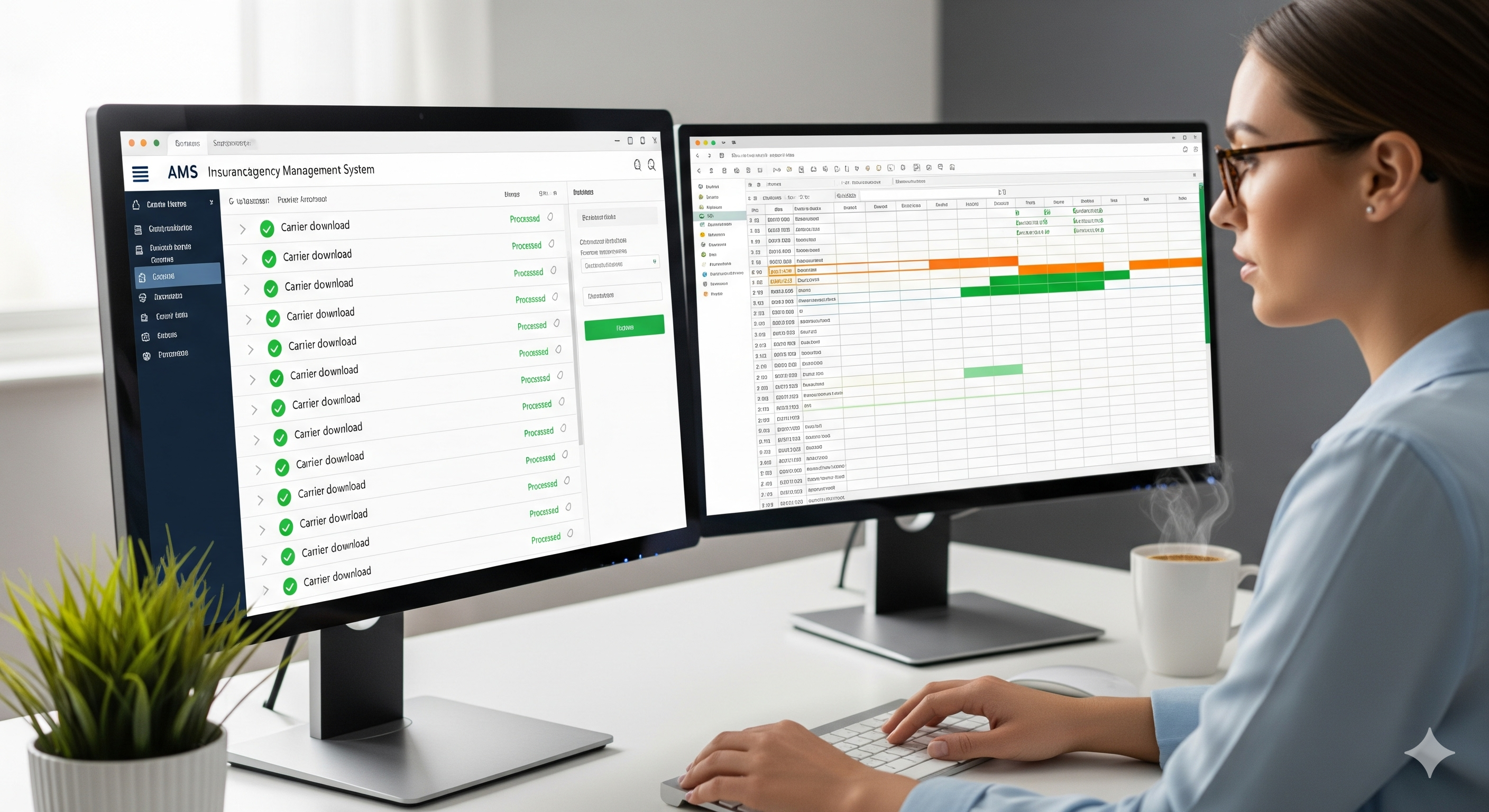
    ✅ Monitor Carrier Downloads Daily

    Check for any new activity in your AMS and review download logs for accuracy.

    ✅ Verify Policy Updates

    Match download data against existing client records. Flag discrepancies and make updates where needed.

    ✅ Process Suspense Items

    Clear suspense tasks generated by carrier downloads and follow through on action items.

    ✅ Handle Exceptions and Errors

    Fix mismatched data, notify agents of missing items, or escalate as needed.

    ✅ Maintain Clean Client Files

    Ensure policies, coverages, billing, and notes are up-to-date across all client accounts.

    ✅ Notify Producers of Key Events

    Send summaries or internal updates on important activity like cancellations, reinstatements, or billing issues.

    ✅ Follow Up With Carriers

    If download data is incomplete or missing, your VA can contact the carrier directly to resolve it.


    Why Most Insurance Agencies Struggle With Downloads

    Even if you’ve got a great AMS, most platforms still require:

    • Manual corrections
    • Constant cross-checking
    • Human decision-making

    That means one of your producers or CSRs has to stop what they’re doing just to fix download issues. This slows down sales, service, and response times.

    If you don’t have enough back-office support, downloads become a silent bottleneck in your workflow.


    How a Virtual Assistant Solves the Problem

    When you bring in a virtual assistant who’s already trained in carrier download tasks, you immediately free up your licensed team to do what they do best—sell and serve clients.

    Here’s what changes:

    • Your downloads are reviewed daily, not whenever someone finds time.
    • Suspense items are processed before they pile up.
    • Your AMS stays accurate, clean, and audit-ready.
    • Your producers aren’t spending time fixing backend admin issues.

    In other words, your agency runs leaner, faster, and more profitably.


    What Kind of VAs Are Best for This Work?

    Not all virtual assistants are built for insurance work. Look for these qualities:

    • Experience with AMS systems (like EZLynx, HawkSoft, TAM, Applied)
    • Understanding of P&C insurance operations
    • Familiarity with carrier downloads and endorsement processing
    • Strong attention to detail and file accuracy
    • Clear written communication skills for internal updates

    The right VA can integrate into your workflow within days—not weeks.


    Sample Workflow: Carrier Downloads with a VA

    Here’s how a typical day might look with a VA handling carrier downloads:

    1. Check download reports in AMS
    2. Flag incomplete or mismatched entries
    3. Process updates in client files
    4. Resolve suspense or exceptions
    5. Summarize changes and notify producer if needed
    6. Track recurring issues or follow-ups with carriers

    All while your core team stays focused on clients.

    Why This Matters for Small Agencies

    You might not have the budget for full-time admin staff, but your download volume keeps growing. That leads to overwhelmed CSRs, missed items, and internal frustration.

    Hiring a VA trained in insurance carrier downloads gives you the best of both worlds:

    ✅ Reliable support
    ✅ Affordable cost
    ✅ Seamless delegation
    ✅ Higher team efficiency

    And your agency becomes more professional and responsive overnight.


    5 Quick Benefits of Outsourcing Carrier Downloads

    • You reduce E&O exposure
    • Producers can focus on revenue, not admin
    • Your AMS stays accurate and organized
    • Client service gets faster and cleaner
    • You avoid burnout on your small team
    image shows the positive outcome for the entire agency.

    Ready to Get Carrier Downloads Off Your Plate?

    If managing downloads is draining your team, it’s time to delegate.

    A trained virtual assistant can take over this repetitive, crucial task—and do it with precision. You’ll get peace of mind knowing your data is accurate, your files are clean, and your team is focused on growth.

    Carrier downloads are necessary—but they don’t need to be your problem anymore.