Introduction: The Hidden Costs of Disorganized Contractor Files
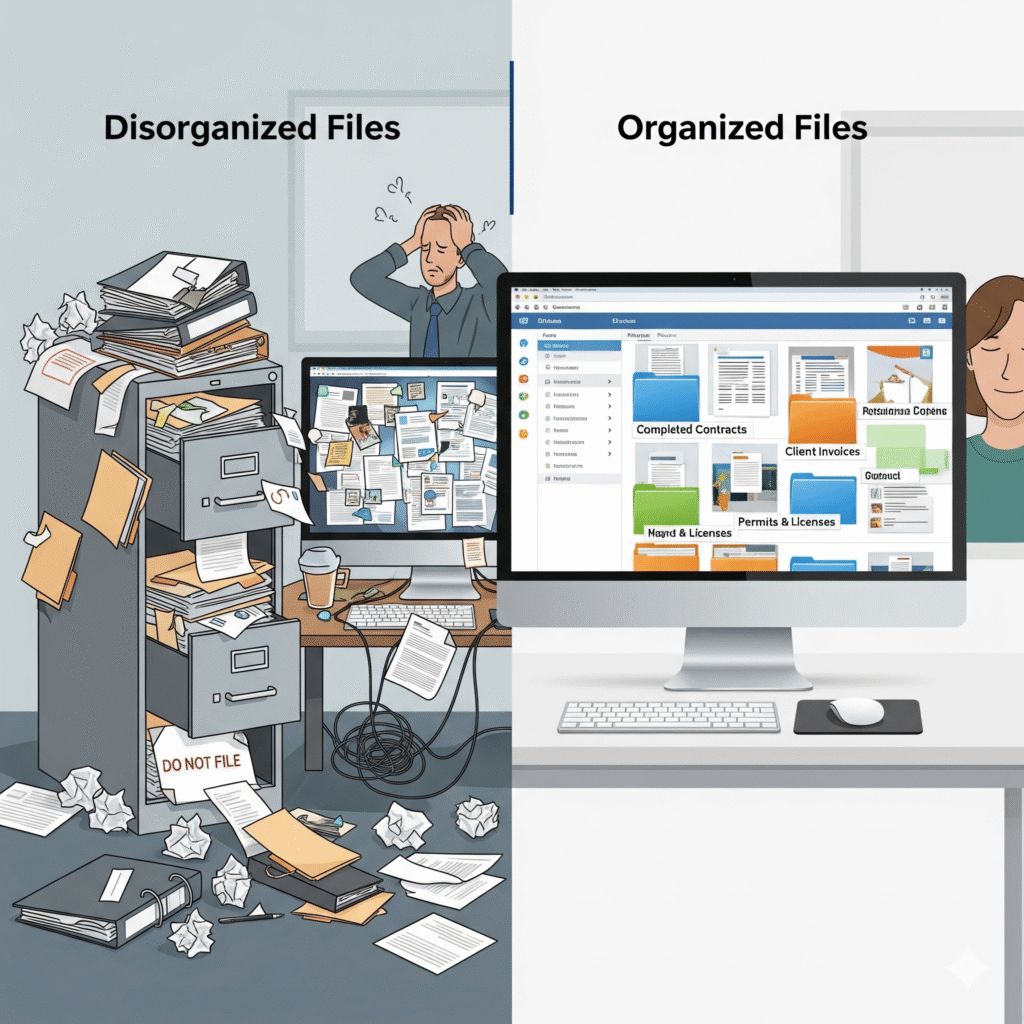
In the fast-paced world of construction, paperwork often takes a backseat to project execution. However, disorganized contractor files can lead to significant problems that impact your bottom line. According to a Construction Management Association survey, construction companies lose an average of 5.5 hours per week searching for information in disorganized filing systems. For a typical general contractor, this translates to approximately $31,000 in wasted productivity annually.
Beyond lost time, disorganized files create additional risks:
- Missing contract details during disputes
- Expired insurance certificates leaving you liable
- Lost change orders resulting in unbilled work
- Compliance violations during audits
- Delayed project timelines due to missing documentation
For construction business owners already stretched thin, creating and maintaining an organized filing system often falls to the bottom of the priority list. This is where a strategic partnership with a virtual assistant can transform your operations and protect your business.
In this comprehensive guide, we’ll walk through exactly how to leverage a virtual assistant to create, implement, and maintain an efficient contractor file organization system that saves time, reduces risk, and improves your bottom line.
Why Virtual Assistants Excel at Contractor File Organization
Before diving into the process, it’s important to understand why virtual assistants are particularly well-suited for contractor file organization:
- Dedicated focus: Unlike on-site staff who face constant interruptions, VAs can concentrate exclusively on creating and maintaining your filing system.
- Consistent application: VAs follow established protocols without deviation, ensuring your system remains standardized across all projects.
- Specialized expertise: Firms like Citrus Assistants employ VAs with construction industry experience who understand the importance of proper documentation.
- Cost efficiency: A dedicated virtual assistant costs 65-76% less than a full-time administrative employee while providing specialized expertise.
With these advantages in mind, let’s explore the step-by-step process of implementing a contractor file organization system with your virtual assistant.
Step 1: Audit Your Current Documentation System
The first task to delegate to your virtual assistant is a comprehensive audit of your existing filing system.
What Your VA Will Do:
- Inventory all current contractor files (digital and physical)
- Identify inconsistencies in naming conventions
- Document missing or incomplete files
- Assess current storage solutions (software, physical filing cabinets, shared drives)
- Interview key team members about pain points in the current system
- Create a report highlighting areas for improvement
How to Delegate This Task:
Provide your Citrus Assistant with:
- Access to your current file storage locations
- A list of team members who regularly interact with contractor files
- Examples of complete vs. incomplete files
- Any existing filing protocols (even informal ones)
The Result:
Your VA will deliver a comprehensive audit report identifying gaps, redundancies, and inefficiencies in your current system. This creates the foundation for building an improved organization method.
Step 2: Design a Standardized Filing Structure
Based on the audit findings, your virtual assistant will create a standardized filing structure customized to your specific business needs.
What Your VA Will Do:
- Design a logical hierarchy for all contractor files
- Create standardized naming conventions
- Develop folder templates for each project/contractor
- Establish document categories (contracts, insurance, credentials, communications, etc.)
- Determine appropriate storage solutions (digital, physical, or hybrid)
- Draft protocols for file versioning
The Ideal Contractor File Structure
For most construction companies, an effective contractor file structure includes:
Digital Main Categories:
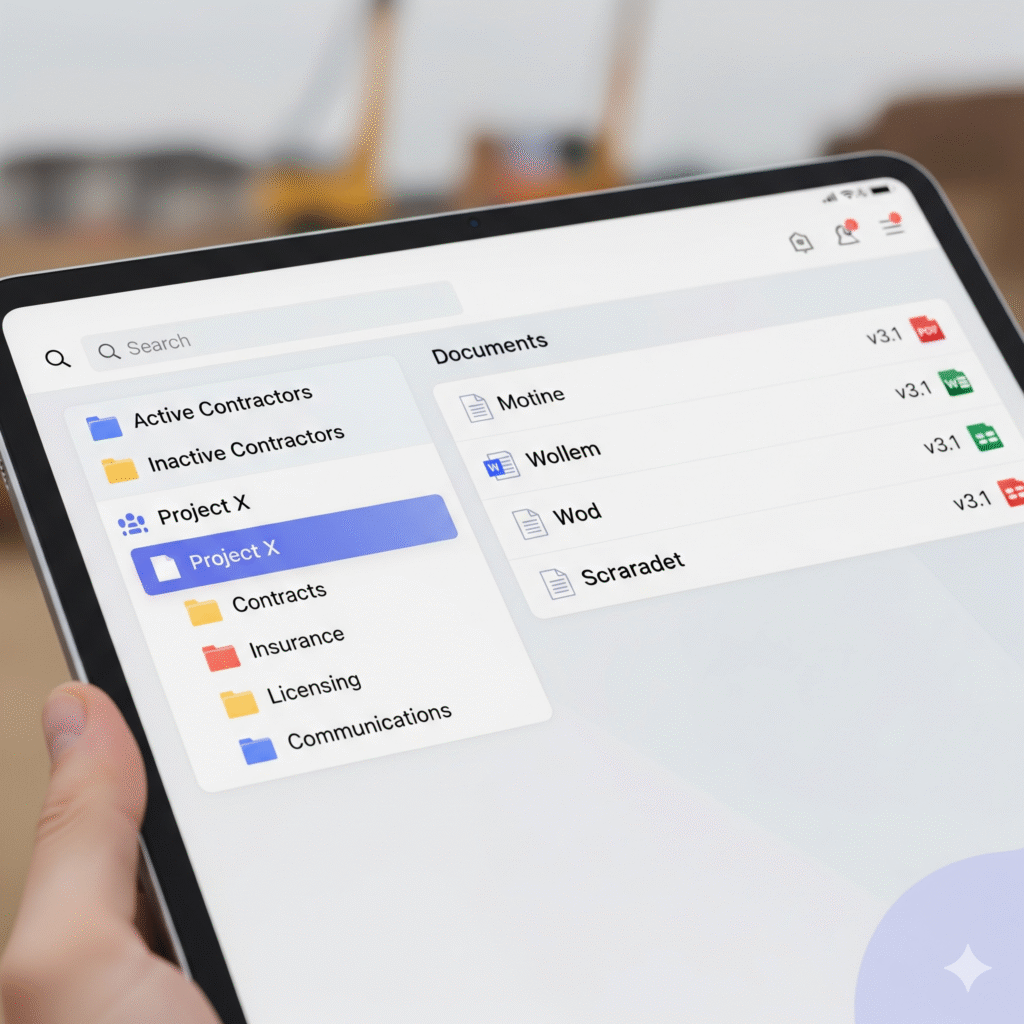
- Active Contractors
- Inactive Contractors
- Specialty Categories (by trade)
- Compliance Documentation
- Historical Performance
For Each Contractor:
- Master Agreement
- Insurance Documentation
- Licensing & Certifications
- Project-Specific Contracts
- Payment History
- Performance Evaluations
- Communication Records
How to Delegate This Task:
- Share any industry compliance requirements with your VA
- Discuss your typical contractor relationships and documentation needs
- Specify any existing software that should be incorporated
- Provide feedback on their proposed structure
The Result:
A comprehensive filing structure proposal, including naming conventions, folder hierarchies, and document categorization customized to your business.
Step 3: Implement the Digital Organization System
With the structure defined, your virtual assistant will implement the new system, transferring existing files and creating new standardized documentation.
What Your VA Will Do:
- Set up the approved folder structure in your preferred platform(s)
- Transfer and rename existing files according to the new convention
- Create index documents for easy navigation
- Establish digital tagging systems for searchability
- Implement access controls based on employee roles
- Create templates for standard contractor documents
Best Practices for Construction Document Management
Your Citrus Assistant will implement industry best practices, including:
- Cloud-based storage: Ensuring access from job sites and remote locations
- Automated backups: Preventing catastrophic data loss
- Version control: Tracking document changes over time
- Cross-referencing: Linking related documents for easy reference
- Search optimization: Making documents findable through logical keywords
How to Delegate This Task:
- Provide access to your preferred file storage platform
- Approve the proposed folder structure
- Set priority levels for different contractor categories
- Define user access permissions
The Impact:
Construction companies implementing standardized digital filing systems report finding critical documents 83% faster than with traditional filing methods. This translates to approximately 4.7 hours saved weekly for the average contractor.
Step 4: Create a Physical Filing System Complement
While digital organization offers numerous advantages, many construction companies still require physical documentation. Your VA can design a complementary physical system.
What Your VA Will Do:
- Design a physical filing system that mirrors the digital structure
- Create standardized labels for folders and cabinets
- Develop a check-out system for physical documents
- Generate index sheets for physical file cabinets
- Establish protocols for scanning and digitizing physical documents
How to Delegate This Task:
- Share your current physical storage capacity
- Specify which documents require physical copies
- Discuss preferences for physical organization tools
- Determine scanning/digitization priorities
The Result:
A comprehensive physical filing system that complements your digital organization, with clear cross-referencing between the two.
Step 5: Develop Documentation Maintenance Protocols
The most effective filing systems include clear protocols for ongoing maintenance. Your VA will establish these procedures.
What Your VA Will Do:
- Create documentation intake processes
- Develop routines for filing new contractor documents
- Establish regular auditing schedules
- Design protocols for archiving inactive contractors
- Create alerts for expiring documents (insurance, licenses, etc.)
- Develop reference guides for team members
Critical Documents Requiring Tracking
Your virtual assistant will establish tracking systems for time-sensitive documents such as:
- Insurance certificates (with expiration alerts)
- Contractor licenses and certifications
- Project-specific qualifications
- Bonding capacity documentation
- Safety program verifications
- Pre-qualification renewals
How to Delegate This Task:
- Review and approve proposed maintenance protocols
- Specify frequency of system audits and updates
- Identify team members who will interact with the system
- Determine notification preferences for expiring documents
The Impact:
Construction companies with established documentation maintenance protocols experience 76% fewer compliance issues and significantly reduced liability exposure due to expired contractor credentials or insurance.
Step 6: Implement Regular Compliance Checks
Your virtual assistant can perform regular compliance checks to ensure all contractor documentation remains current and complete.
What Your VA Will Do:
- Conduct weekly scans for soon-to-expire documents
- Send automated reminders to contractors for updated documentation
- Perform monthly system audits to identify incomplete files
- Generate compliance reports for management review
- Track document request status with contractors
- Escalate non-compliance issues to management
How to Delegate This Task:
- Establish compliance review frequency
- Approve communication templates for contractor outreach
- Set escalation thresholds for non-compliance
- Determine reporting requirements
The Result:
Proactive compliance management, preventing project delays and liability issues resulting from expired or missing contractor documentation.
Step 7: Integrate with Project Management Processes
An effective contractor file system should connect seamlessly with your project management workflow. Your VA can create these integrations.
What Your VA Will Do:
- Link contractor files to specific projects
- Create project-specific contractor lists with documentation status
- Generate pre-bid qualification reports
- Develop subcontractor onboarding packages
- Create project closeout documentation checklists
- Prepare contractor evaluation forms
How to Delegate This Task:
- Share your current project management tools and processes
- Specify project documentation requirements
- Discuss typical project timelines and contractor touchpoints
- Provide examples of project-contractor relationships
The Impact:
Integrated contractor and project management systems reduce project initiation time by an average of 3.2 days and improve subcontractor performance through better documentation access.
Step 8: Create Automated Reporting Systems
Your virtual assistant can implement automated reporting to keep you informed of contractor documentation status without requiring your constant attention.
What Your VA Will Do:
- Design weekly compliance status reports
- Create contractor qualification summaries
- Generate expiration alerts for critical documents
- Develop contractor performance dashboards
- Implement notification systems for high-priority issues
- Create historical documentation tracking
Sample Report Types
Effective contractor file management typically includes:
- Compliance Scorecards: At-a-glance view of documentation completeness
- Expiration Calendars: Visual timeline of upcoming document renewals
- Contractor Qualification Reports: Summarized capabilities and credentials
- Documentation Gap Analysis: Identification of missing paperwork
- Historical Performance Metrics: Documentation timeliness and completeness over time
How to Delegate This Task:
- Specify your preferred reporting format and frequency
- Identify key metrics you want to track
- Determine distribution lists for different report types
- Set alert thresholds for issues requiring immediate attention
The Result:
Comprehensive visibility into your contractor documentation status without requiring your direct involvement in day-to-day file management.
Step 9: Train Your Team on the New System
Even the best organization system fails if your team doesn’t know how to use it. Your VA can create and deliver training materials.
What Your VA Will Do:
- Develop user guides for the filing system
- Create video tutorials for common tasks
- Establish a FAQ document for troubleshooting
- Schedule virtual training sessions with team members
- Create quick-reference sheets for frequent processes
- Offer ongoing support for questions
How to Delegate This Task:
- Identify team members who need system access
- Specify training priorities and formats
- Schedule appropriate training time frames
- Determine ongoing support protocols
The Impact:
Comprehensive team training ensures high adoption rates for new systems. Companies report 94% higher success rates for filing systems when accompanied by formal training programs.
Step 10: Continuous Improvement and Optimization
The final step is establishing processes for ongoing system refinement. Your VA will implement feedback loops and optimization protocols.
What Your VA Will Do:
- Collect user feedback on system functionality
- Track time savings and efficiency metrics
- Identify bottlenecks in documentation processing
- Research industry best practices for updates
- Implement quarterly system reviews and improvements
- Update protocols based on regulatory changes
How to Delegate This Task:
- Establish feedback collection methods
- Determine review frequency for system optimization
- Specify metrics for measuring system performance
- Approve authorization processes for system changes
The Result:
A continuously improving contractor file organization system that evolves with your business needs and industry requirements.
Quick Takeaway Box
Key Takeaway: Implementing a comprehensive contractor file organization system with a virtual assistant from Citrus Assistants can save construction companies an average of 5.5 hours weekly while significantly reducing compliance risks. The systematic approach outlined in this guide transforms chaotic documentation into a strategic asset, improving contractor relationships, project execution, and regulatory compliance.
Case Study: Real Results from Implementing VA-Managed Contractor Files
Mid-Sized Commercial Contractor Transformation
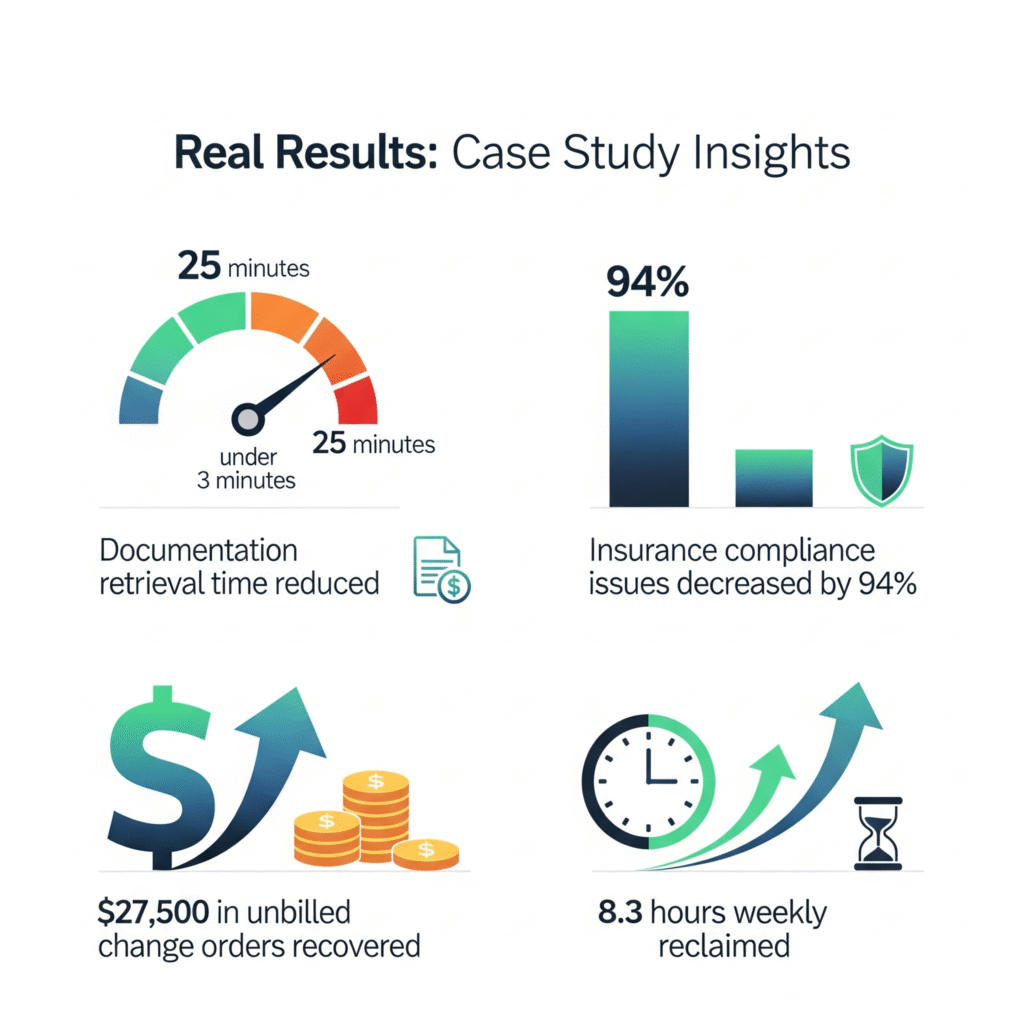
A commercial contractor in Texas with 15-20 active subcontractors per project implemented the Citrus Assistants contractor file organization system with these results:
- Documentation retrieval time reduced from 25 minutes to under 3 minutes
- Insurance compliance issues decreased by 94%
- Project start delays due to missing documentation eliminated
- 8.3 hours weekly reclaimed for the owner and project managers
- $27,500 in unbilled change orders recovered through improved documentation
The contractor reported: “Having our VA manage our contractor files has completely transformed our operations. We’re more organized, more compliant, and actually utilizing our documentation strategically now.”
Common Questions About VA-Managed Contractor Files
How Long Does It Take to Implement a Complete System?
For most construction companies, the initial setup takes 2-4 weeks, depending on the volume of existing files and their current state. Your Citrus Assistant will develop a phased implementation plan, allowing you to begin benefiting from improved organization immediately while the complete system is being built.
What Software Do You Recommend for Contractor File Management?
The ideal software depends on your specific needs and existing systems. Your VA can work with common platforms like Procore, Buildertrend, or PlanGrid, or implement simpler solutions using Microsoft SharePoint, Google Drive, or Dropbox Business. Your Citrus Assistant will evaluate your needs and recommend appropriate options.
How Do We Handle Confidential Information?
Citrus Assistants adheres to strict confidentiality protocols. Your VA will implement appropriate access controls, encryption, and security measures based on your requirements. We can also establish specific protocols for particularly sensitive documents, such as financial information or proprietary data.
What If Our Current Filing System Is a Complete Mess?
The more disorganized your current system, the more you’ll benefit from professional organization. Your VA will start by creating order within the chaos, prioritizing current active contractors and time-sensitive documentation, then systematically working through historical files according to your priorities.
How Much VA Time Is Required for Ongoing Maintenance?
After initial implementation, most construction companies require 5-10 hours weekly of VA time for contractor file maintenance, depending on the number of active contractors and projects. Your Citrus Assistant will provide a customized estimate based on your specific business volume.
Conclusion: Transform Contractor Documentation from Liability to Asset
Disorganized contractor files represent both a significant time drain and a substantial liability risk for construction companies. By implementing a systematic approach with a specialized virtual assistant from Citrus Assistants, you can transform your documentation from a chaotic burden into a strategic business asset.
The ten-step process outlined in this guide provides a comprehensive roadmap for delegating contractor file organization to your virtual assistant. The result is a system that:
- Saves valuable time previously lost to searching for documents
- Reduces compliance risks through proactive document tracking
- Improves contractor relationships through streamlined documentation
- Provides critical business intelligence through organized data
- Protects your company during disputes or audits
- Scales efficiently as your business grows
Ready to transform your contractor file management and reclaim hours of productive time each week? Citrus Assistants specializes in creating and maintaining efficient documentation systems specifically for construction companies.
Call to Action
Stop wasting valuable hours searching for contractor documentation. Schedule a free consultation with Citrus Assistants today to discover how our construction-specialized virtual assistants can transform your contractor file management.
[Schedule Your Free Consultation] [Download Our Contractor File Organization Checklist]
Join the Conversation
How does your construction company currently manage contractor files? What’s your biggest documentation challenge? Share your experiences in the comments below!
References
- Construction Management Association of America. (2023). Documentation Management in Construction Survey.
- Associated General Contractors of America. (2022). Best Practices in Subcontractor Management.
- Journal of Construction Engineering and Management. (2023). Documentation Systems Impact on Construction Productivity.
- Construction Financial Management Association. (2023). Risk Mitigation Through Documentation Strategies.
- American Subcontractors Association. (2022). Subcontractor Document Management Guidelines.